
DIY 4 Channel DC Digital Voltmeter

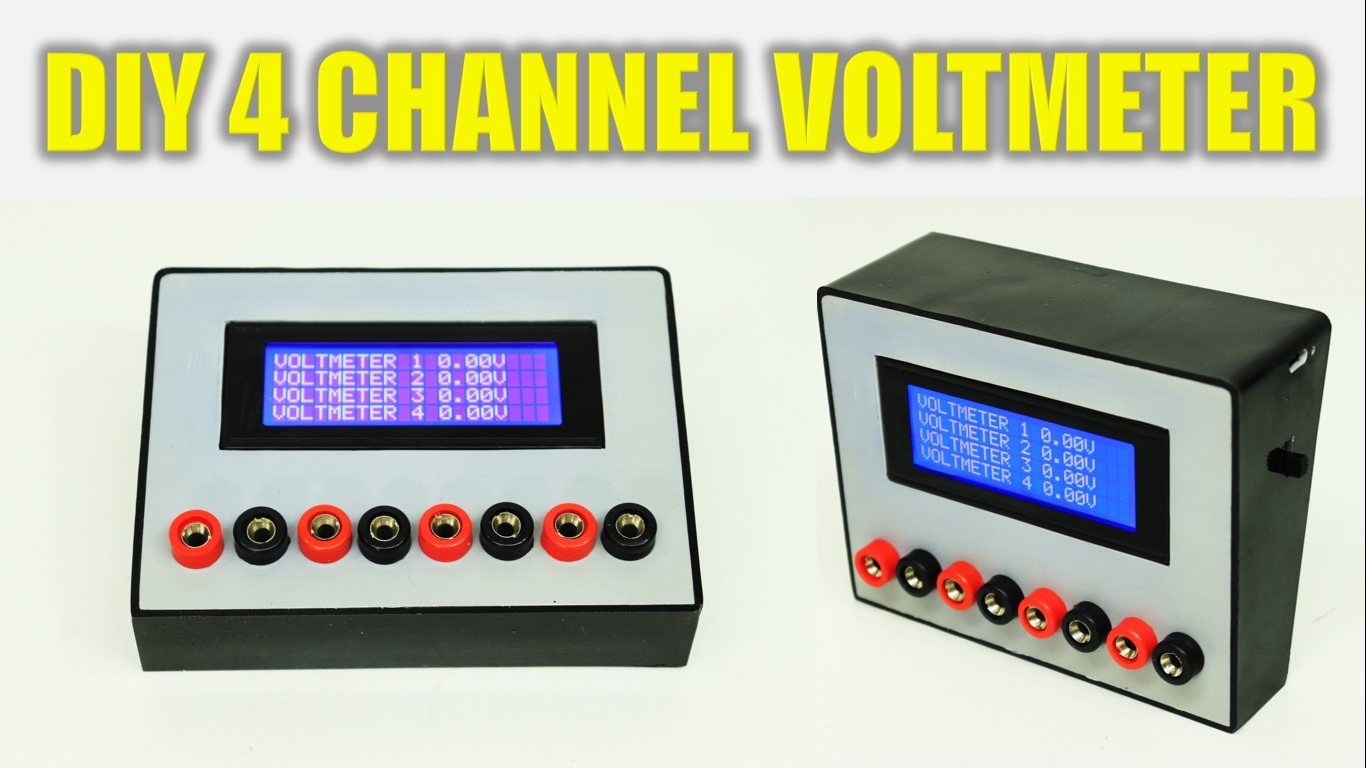
This is 4 channel DC digital voltmeter. In normal multimeter you can check one volt at a time but in this voltmeter you can check four different volt at a time. Also design cashing with PVC pipe for professional looking. This is very easy to make, just follow all the step in the video and make your own 4 channel voltmeter.

Components:

1) Banana Jack Plug Connector & Socket 4mm Male +Female : https://roboman.in/kmrk
2) LCD2004 Parallel LCD Display : https://roboman.in/19uy
3) TP-4056 Module : https://roboman.in/oa0m
4) Arduino Nano: https://roboman.in/59h4
5) Arduino Nano Type C : https://roboman.in/xkfu
6) MT-3608 Boost module : https://roboman.in/xdcw
7) 100K resistor: https://roboman.in/9h3u
8) 10K resistor: https://roboman.in/e3xw
9) SPST Switch : https://roboman.in/74he
10) 18650 Lithium Battery 2500mah 3C :https://roboman.in/utwc
10) 18650 Lithium Battery 2600mah 3C :https://roboman.in/mmab
10) 18650 Lithium Battery 2200mah 1C :https://roboman.in/70b5
10) 18650 Lithium Battery 2000mah 1C :https://roboman.in/7em9
10) 18650 Lithium Battery 1800mah 1C :https://roboman.in/ywss

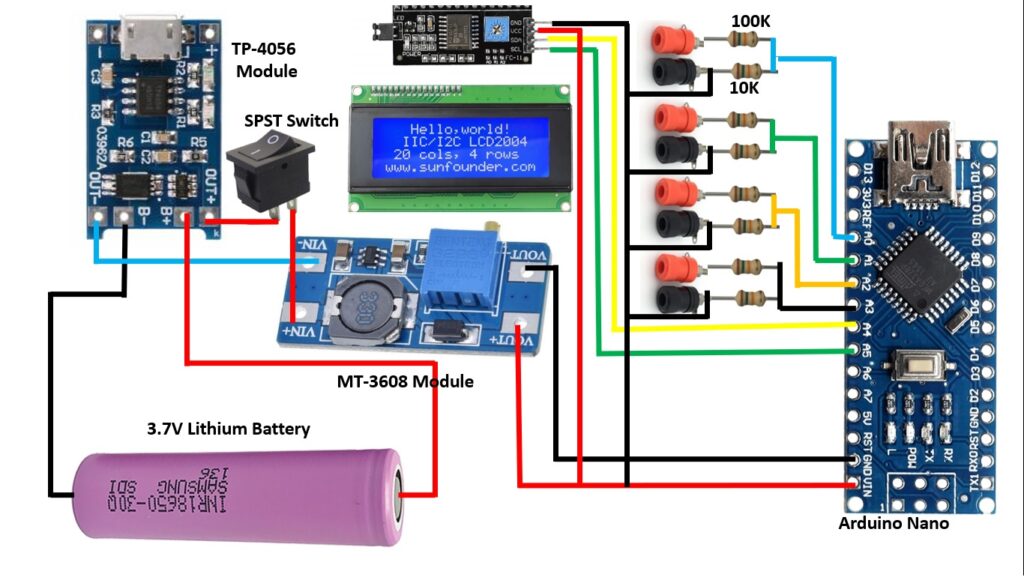
Diagram :
Code :

#include "Wire.h" 
#include "LiquidCrystal_I2C.h" // library for I@C interface

LiquidCrystal_I2C lcd(0x27, 20, 4);
int analogInput = A0;
int analogInput1 = A1;
int analogInput2 = A2;
int analogInput3 = A3;
float Vout = 0.00;
float Vout1 = 0.00;
float Vout2 = 0.00;
float Vout3 = 0.00;
float Vin,Vin1,Vin2,Vin3  = 0.00;
float R1 = 99500.00; // resistance of R1 (100K) 
float R2 = 10000.00; // resistance of R2 (10K) 
float R3 = 98200.00; // resistance of R1 (100K) 
float R4 = 10000.00; // resistance of R2 (10K) 
float R5 = 98100.00; // resistance of R1 (100K) 
float R6 = 10000.00; // resistance of R2 (10K) 
float R7 = 100500.00; // resistance of R1 (100K) 
float R8 = 10000.00; // resistance of R2 (10K) 
int val,val1,val2,val3 = 0;
void setup(){
lcd.begin(20, 4);
    lcd.backlight();
    
   pinMode(analogInput, INPUT); //assigning the input port
   pinMode(analogInput1, INPUT); //assigning the input port
   pinMode(analogInput2, INPUT); //assigning the input port
   pinMode(analogInput3, INPUT); //assigning the input port
   Serial.begin(9600); //BaudRate
   lcd.setCursor(2,0);
   lcd.print("4 CHANNEL DIGITAL ");
lcd.setCursor(6,1);
   lcd.print("VOLTMETER");
   lcd.setCursor(6,3);
   lcd.print("LOADING....");
   delay(5000);
   lcd.clear();
}
void loop(){
   lcd.clear();
   val = analogRead(analogInput);//reads the analog input
   Vout = (val * 5.00) / 1024.00; // formula for calculating voltage out i.e. V+, here 5.00
   Vin = Vout / (R2/(R1+R2)); // formula for calculating voltage in i.e. GND
   
     val1 = analogRead(analogInput1);//reads the analog input
   Vout1 = (val1 * 5.00) / 1024.00; // formula for calculating voltage out i.e. V+, here 5.00
   Vin1 = Vout1 / (R4/(R3+R4)); // formula for calculating voltage in i.e. GND
   
    val2 = analogRead(analogInput2);//reads the analog input
   Vout2 = (val2 * 5.00) / 1024.00; // formula for calculating voltage out i.e. V+, here 5.00
   Vin2 = Vout2 / (R6/(R5+R6)); // formula for calculating voltage in i.e. GND

     val3 = analogRead(analogInput3);//reads the analog input
   Vout3 = (val3 * 5.00) / 1024.00; // formula for calculating voltage out i.e. V+, here 5.00
   Vin3 = Vout3 / (R8/(R7+R8)); // formula for calculating voltage in i.e. GND
   
   if (Vin<0.09)//condition 
   {
     Vin=0.00;//statement to quash undesired reading !
  } 
    if (Vin1<0.09)//condition 
   {
     Vin1=0.00;//statement to quash undesired reading !
  } 
    if (Vin2<0.09)//condition 
   {
     Vin2=0.00;//statement to quash undesired reading !
  } 
    if (Vin3<0.09)//condition 
   {
     Vin3=0.00;//statement to quash undesired reading !
  } 
Serial.print("\t Voltage of the given source = ");
lcd.setCursor(0,0);
lcd.print("VOLTMETER 1 ");
Serial.println(Vin);
lcd.print(Vin);
lcd.print("V");
Serial.print("\t Voltage of the given source 2 = ");

lcd.setCursor(0,1);
lcd.print("VOLTMETER 2 ");
Serial.println(Vin1);
lcd.print(Vin1);
lcd.print("V");

lcd.setCursor(0,2);
lcd.print("VOLTMETER 3 ");
Serial.println(Vin2);
lcd.print(Vin2);
lcd.print("V");

lcd.setCursor(0,3);
lcd.print("VOLTMETER 4 ");
Serial.println(Vin3);
lcd.print(Vin3);
lcd.print("V");
delay(1000); //for maintaining the speed of the output in serial moniter
}

DIY 4 Channel DC Digital Voltmeter

This is 4 channel DC digital voltmeter. In normal multimeter you can check one volt at a time but in this voltmeter you can check four different volt at a time. Also design cashing with PVC pipe for professional looking. This is very easy to make, just follow all the step in the video and make your own 4 channel voltmeter.

Components:

1) Banana Jack Plug Connector & Socket 4mm Male +Female : https://roboman.in/kmrk
2) LCD2004 Parallel LCD Display : https://roboman.in/19uy
3) TP-4056 Module : https://roboman.in/oa0m
4) Arduino Nano: https://roboman.in/59h4
5) Arduino Nano Type C : https://roboman.in/xkfu
6) MT-3608 Boost module : https://roboman.in/xdcw
7) 100K resistor: https://roboman.in/9h3u
8) 10K resistor: https://roboman.in/e3xw
9) SPST Switch : https://roboman.in/74he
10) 18650 Lithium Battery 2500mah 3C :https://roboman.in/utwc
10) 18650 Lithium Battery 2600mah 3C :https://roboman.in/mmab
10) 18650 Lithium Battery 2200mah 1C :https://roboman.in/70b5
10) 18650 Lithium Battery 2000mah 1C :https://roboman.in/7em9
10) 18650 Lithium Battery 1800mah 1C :https://roboman.in/ywss

Diagram :

Code :

#include "Wire.h" 
#include "LiquidCrystal_I2C.h" // library for I@C interface

LiquidCrystal_I2C lcd(0x27, 20, 4);
int analogInput = A0;
int analogInput1 = A1;
int analogInput2 = A2;
int analogInput3 = A3;
float Vout = 0.00;
float Vout1 = 0.00;
float Vout2 = 0.00;
float Vout3 = 0.00;
float Vin,Vin1,Vin2,Vin3  = 0.00;
float R1 = 99500.00; // resistance of R1 (100K) 
float R2 = 10000.00; // resistance of R2 (10K) 
float R3 = 98200.00; // resistance of R1 (100K) 
float R4 = 10000.00; // resistance of R2 (10K) 
float R5 = 98100.00; // resistance of R1 (100K) 
float R6 = 10000.00; // resistance of R2 (10K) 
float R7 = 100500.00; // resistance of R1 (100K) 
float R8 = 10000.00; // resistance of R2 (10K) 
int val,val1,val2,val3 = 0;
void setup(){
lcd.begin(20, 4);
    lcd.backlight();
    
   pinMode(analogInput, INPUT); //assigning the input port
   pinMode(analogInput1, INPUT); //assigning the input port
   pinMode(analogInput2, INPUT); //assigning the input port
   pinMode(analogInput3, INPUT); //assigning the input port
   Serial.begin(9600); //BaudRate
   lcd.setCursor(2,0);
   lcd.print("4 CHANNEL DIGITAL ");
lcd.setCursor(6,1);
   lcd.print("VOLTMETER");
   lcd.setCursor(6,3);
   lcd.print("LOADING....");
   delay(5000);
   lcd.clear();
}
void loop(){
   lcd.clear();
   val = analogRead(analogInput);//reads the analog input
   Vout = (val * 5.00) / 1024.00; // formula for calculating voltage out i.e. V+, here 5.00
   Vin = Vout / (R2/(R1+R2)); // formula for calculating voltage in i.e. GND
   
     val1 = analogRead(analogInput1);//reads the analog input
   Vout1 = (val1 * 5.00) / 1024.00; // formula for calculating voltage out i.e. V+, here 5.00
   Vin1 = Vout1 / (R4/(R3+R4)); // formula for calculating voltage in i.e. GND
   
    val2 = analogRead(analogInput2);//reads the analog input
   Vout2 = (val2 * 5.00) / 1024.00; // formula for calculating voltage out i.e. V+, here 5.00
   Vin2 = Vout2 / (R6/(R5+R6)); // formula for calculating voltage in i.e. GND

     val3 = analogRead(analogInput3);//reads the analog input
   Vout3 = (val3 * 5.00) / 1024.00; // formula for calculating voltage out i.e. V+, here 5.00
   Vin3 = Vout3 / (R8/(R7+R8)); // formula for calculating voltage in i.e. GND
   
   if (Vin<0.09)//condition 
   {
     Vin=0.00;//statement to quash undesired reading !
  } 
    if (Vin1<0.09)//condition 
   {
     Vin1=0.00;//statement to quash undesired reading !
  } 
    if (Vin2<0.09)//condition 
   {
     Vin2=0.00;//statement to quash undesired reading !
  } 
    if (Vin3<0.09)//condition 
   {
     Vin3=0.00;//statement to quash undesired reading !
  } 
Serial.print("\t Voltage of the given source = ");
lcd.setCursor(0,0);
lcd.print("VOLTMETER 1 ");
Serial.println(Vin);
lcd.print(Vin);
lcd.print("V");
Serial.print("\t Voltage of the given source 2 = ");

lcd.setCursor(0,1);
lcd.print("VOLTMETER 2 ");
Serial.println(Vin1);
lcd.print(Vin1);
lcd.print("V");

lcd.setCursor(0,2);
lcd.print("VOLTMETER 3 ");
Serial.println(Vin2);
lcd.print(Vin2);
lcd.print("V");

lcd.setCursor(0,3);
lcd.print("VOLTMETER 4 ");
Serial.println(Vin3);
lcd.print(Vin3);
lcd.print("V");
delay(1000); //for maintaining the speed of the output in serial moniter
}

Search

Popular Posts

  • DIY Components Tester | Test Resistors, Capacitors, Transistors, and More!

    Learn how to make a DIY components tester at home! This project helps you test electronic components like resistors, capacitors, diodes, transistors, and more with ease. Follow this step-by-step guide to build your own affordable and reliable tester using basic tools and components. Perfect for electronics enthusiasts, students, and hobbyists looking to troubleshoot or organize…

  • How To Make Wireless RGB LED Matrix Text Display
    How To Make Wireless RGB LED Matrix Text Display

    Create your own RGB LED Matrix Text Display with this comprehensive DIY tutorial! Perfect for tech enthusiasts and hobbyists, this video will guide you through each step, from selecting the right components to programming and assembling your LED matrix. Watch as we break down the entire process in an easy-to-understand way, helping you bring vibrant,…

  • Amazing Idea Using Lizol Empty Bottle And RGB LED Strip
    Amazing Idea Using Lizol Empty Bottle And RGB LED Strip

    Hello Friends, This is cool projects for your home. This RGB LED light gives you multiple color effects in your room. In this projects I used WS2812B LED strip to control all led with single wire. This is very simple to make. Just follow all the step and make your own RGB led light Diagram…

Categories

error:
0
    0
    Your Cart
    Your cart is emptyReturn to Shop