
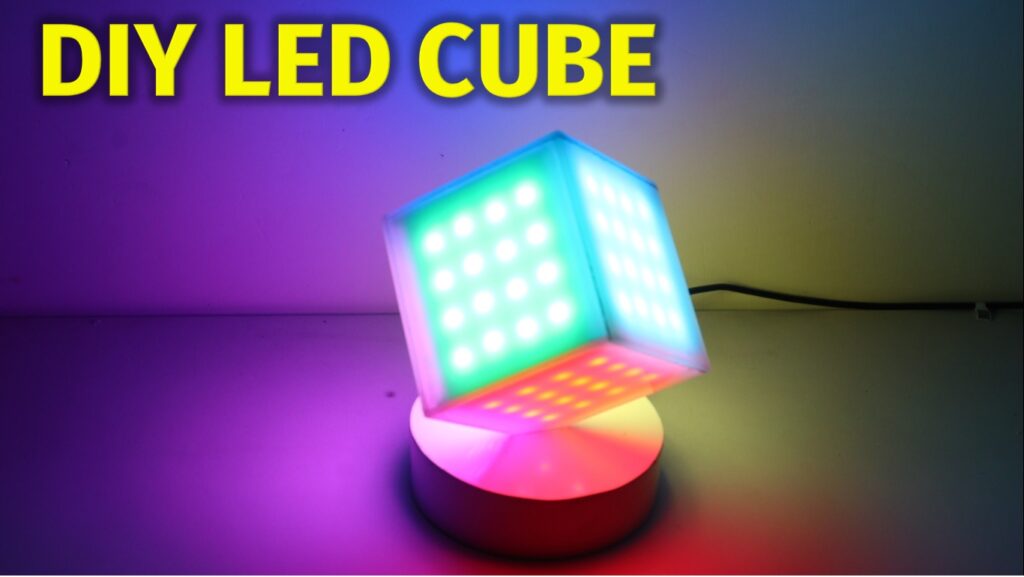
Hello friends, this is very cool project using RGB LED strip and glue stick. New look RGB light will provide you good look on your table. In this projects I used WS2812 addressable RGB LED, so it is very simple to handle Colors on this light.
Diagram :


Components:
1) ws2812B led strip 60led/m : https://roboman.in/qtch
2) ws2812B led strip 30led/m : https://roboman.in/6r9a
3) TP-4056 Module : https://roboman.in/oa0m
4) Arduino Nano: https://roboman.in/59h4
5) Arduino Nano Type C : https://roboman.in/xkfu
6) Sound Sensor : Sound Sensor :https://roboman.in/vs1e
7) 18650 Lithium Battery 2500mah 3C :https://roboman.in/utwc
8) 18650 Lithium Battery 2600mah 3C :https://roboman.in/mmab
9) 18650 Lithium Battery 2200mah 1C :https://roboman.in/70b5
10) 18650 Lithium Battery 2000mah 1C :https://roboman.in/7em9
11) 18650 Lithium Battery 1800mah 1C :https://roboman.in/ywss
Code:
#include <Adafruit_NeoPixel.h>
#ifdef __AVR__
  #include <avr/power.h>
#endif

/* Maxtrix Cube
  *
 *
 *                              00 01 02 03
 *                              07 06 05 04
 *                              08 09 0A 0B
 *                              0F 0E 0D 0C
 *                              ------------
 *  30 31 32 33 | 40 41 42 43 | 10 11 12 13 | 20 21 22 23
 *  37 36 35 34 | 47 46 45 44 | 17 16 15 14 | 27 26 25 24
 *  38 39 3A 3B | 48 49 4A 4B | 18 19 1A 1B | 28 29 2A 2B
 *  3F 3E 3D 3C | 4F 4E 4D 4C | 1F 1E 1D 1C | 2F 2E 2D 2C
 *                -----------
 *                50 51 52 53
 *                57 56 55 54
 *                58 59 5A 5B
 *                5F 5E 5D 5C
 */

#define WS2812_PIN 3
#define LED_PIN 4
#define POWER_PIN 2

#define PIXELS 96
#define BRIGHTNESS 100

uint8_t faces[PIXELS];
uint32_t pallete[6];

Adafruit_NeoPixel strip = Adafruit_NeoPixel(PIXELS, WS2812_PIN, NEO_GRB + NEO_KHZ800);

void(* resetFunc) (void) = 0; //declare reset function @ address 0

void setup()
{
  //First switch on power
  pinMode(POWER_PIN, OUTPUT);
  pinMode(LED_PIN, OUTPUT);
  digitalWrite(POWER_PIN, HIGH);    //Overrides Mercury switch
  digitalWrite(LED_PIN, HIGH);      //Show power is on

  strip.begin();
  strip.setBrightness(BRIGHTNESS);
  strip.show(); // Initialize all pixels to 'off'

  //Set up palette
  pallete[0] = strip.Color(255,0,0);
  pallete[1] = strip.Color(255,255,0);
  pallete[2] = strip.Color(0,255,0);
  pallete[3] = strip.Color(0,255,255);
  pallete[4] = strip.Color(0,0,255);
  pallete[5] = strip.Color(255,0,255);
}

void loop()
{
  strip.clear();

  //colorWipe(strip.Color(255, 255, 255), 50); // white
  //delay(1000);

  colorSides(36, 300);
  rainbow2(20);
  rainbow(20);
  rainbowCycle(20);
  strip.clear();
  strip.show();
  delay(500);

  //Power off
  digitalWrite(POWER_PIN, LOW);

  delay(1000);
  resetFunc();  //call reset
}

//Rotate each side with a primary or secondary color
void colorSides(int changes, int wait)
{
  strip.clear();
  for (int j = 0; j < changes; j++)
  {
    for(int s = 0; s < 6; s++)
    {
      for(int i = 0; i < 16; i++)
      {
        int p = (((s + j) % 6) * 16) + i;
        strip.setPixelColor(p, pallete[s]);
      }
      strip.show();
    }
    delay(wait);
  }
}

// Fill the dots one after the other with a color
void colorWipe(uint32_t c, uint8_t wait)
{
  for(int i = 0; i < strip.numPixels(); i++)
  {
    strip.setPixelColor(i, c);
    strip.show();
    delay(wait);
  }
}

//Display rainbow on all sides
void rainbow(uint8_t wait)
{
  strip.clear();
  for (int k = 0; k < 5; k++)
  {
    for(int j = 0; j < 256; j++)
    {
      for (int s = 0; s < 6; s++) //Do for each side
      {
        int b = s * 16;
        uint32_t c = Wheel((b + j) & 255);
        for(int i = 0; i < 16; i++)
        {
          strip.setPixelColor(b + i, c);
        }
      }
      strip.show();
      delay(wait);
    }
  }
}

//Display rainbow on all sides
void rainbow2(uint8_t wait)
{
  strip.clear();
  for (int k = 0; k < 5; k++)
  {
    for(int j = 0; j < 255; j++)
    {
      uint32_t c = Wheel(j);
      for(int i = 0; i < strip.numPixels(); i++)
      {
        strip.setPixelColor(i, c);
      }
      strip.show();
      delay(wait);
    }
  }
}

// Slightly different, this makes the rainbow equally distributed throughout
void rainbowCycle(uint8_t wait)
{
  strip.clear();
  for(int j = 0; j < 256*5; j++) // 5 cycles of all colors on wheel
  {
    for (int s = 0; s < 6; s++) //Do for each side
    {
      for(int i = 0; i < 16; i++)
      {
        int p = i + s * 16;
        strip.setPixelColor(p, Wheel(((p * 256 / strip.numPixels()) + j) & 255));
      }
    }
    strip.show();
    delay(wait);
  }
}

// Input a value 0 to 255 to get a color value.
// The colours are a transition r - g - b - back to r.
uint32_t Wheel(byte WheelPos)
{
  WheelPos = 255 - WheelPos;
  if(WheelPos < 85)
  {
    return strip.Color(255 - WheelPos * 3, 0, WheelPos * 3);
  }
  if(WheelPos < 170)
  {
    WheelPos -= 85;
    return strip.Color(0, WheelPos * 3, 255 - WheelPos * 3);
  }
  WheelPos -= 170;
  return strip.Color(WheelPos * 3, 255 - WheelPos * 3, 0);
}