
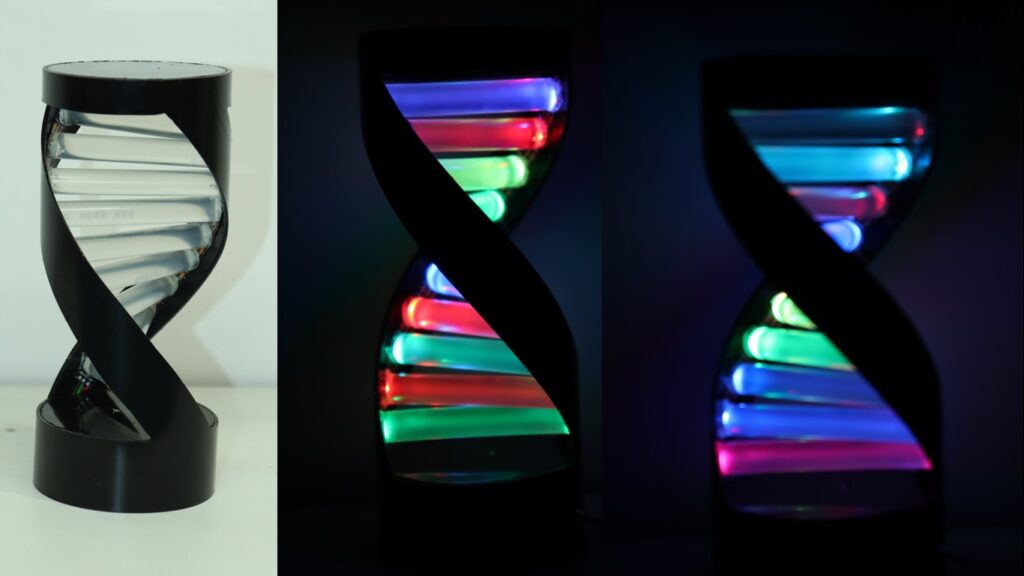
Hello friends, this is very cool project using RGB LED strip and glue stick. New look RGB light will provide you good look on your table. In this projects I used WS2812 addressable RGB LED, so it is very simple to handle Colors on this light.
Circuit Diagram:
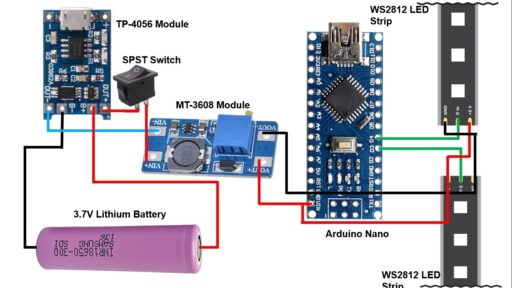
Components :
1) ws2812B led strip 60led/m : https://roboman.in/qtch
2) ws2812B led strip 30led/m : https://roboman.in/6r9a
3) TP-4056 Module : https://roboman.in/oa0m
4) Arduino Nano: https://roboman.in/59h4
5) Arduino Nano Type C : https://roboman.in/xkfu
6) SPST Switch : https://roboman.in/74he
7) 18650 Lithium Battery 2500mah 3C :https://roboman.in/utwc
8) 18650 Lithium Battery 2600mah 3C :https://roboman.in/mmab
9) 18650 Lithium Battery 2200mah 1C :https://roboman.in/70b5
10) 18650 Lithium Battery 2000mah 1C :https://roboman.in/7em9
11) 18650 Lithium Battery 1800mah 1C :https://roboman.in/ywss
12) MT-3608 Boost module : https://roboman.in/xdcw
Code :
// NeoPixel test program showing use of the WHITE channel for RGBW
// pixels only (won't look correct on regular RGB NeoPixel strip1s).

#include <Adafruit_NeoPixel.h>
#ifdef __AVR__
 #include <avr/power.h> // Required for 16 MHz Adafruit Trinket
#endif

// Which pin on the Arduino is connected to the NeoPixels?
// On a Trinket or Gemma we suggest changing this to 1:
#define LED_PINR     3
#define LED_PINL     4

// How many NeoPixels are attached to the Arduino?
#define LED_COUNT  10

// NeoPixel brightness, 0 (min) to 255 (max)
#define BRIGHTNESS 50

// Declare our NeoPixel strip1 object:
Adafruit_NeoPixel strip1=Adafruit_NeoPixel(LED_COUNT, LED_PINR, NEO_GRBW + NEO_KHZ800);
Adafruit_NeoPixel strip2=Adafruit_NeoPixel(LED_COUNT, LED_PINL, NEO_GRBW + NEO_KHZ800);
// Argument 1 = Number of pixels in NeoPixel strip1
// Argument 2 = Arduino pin number (most are valid)
// Argument 3 = Pixel type flags, add together as needed:
//   NEO_KHZ800  800 KHz bitstream (most NeoPixel products w/WS2812 LEDs)
//   NEO_KHZ400  400 KHz (classic 'v1' (not v2) FLORA pixels, WS2811 drivers)
//   NEO_GRB     Pixels are wired for GRB bitstream (most NeoPixel products)
//   NEO_RGB     Pixels are wired for RGB bitstream (v1 FLORA pixels, not v2)
//   NEO_RGBW    Pixels are wired for RGBW bitstream (NeoPixel RGBW products)

void setup() {
  // These lines are specifically to support the Adafruit Trinket 5V 16 MHz.
  // Any other board, you can remove this part (but no harm leaving it):
#if defined(__AVR_ATtiny85__) && (F_CPU == 16000000)
  clock_prescale_set(clock_div_1);
#endif
  // END of Trinket-specific code.
Serial.begin(9600);
  strip1.begin();           // INITIALIZE NeoPixel strip1 object (REQUIRED)
  strip1.show();            // Turn OFF all pixels ASAP
  strip1.setBrightness(50); // Set BRIGHTNESS to about 1/5 (max = 255)
    strip2.begin();           // INITIALIZE NeoPixel strip1 object (REQUIRED)
  strip2.show();            // Turn OFF all pixels ASAP
  strip2.setBrightness(50); // Set BRIGHTNESS to about 1/5 (max = 255)
}

void loop() {
  // Fill along the length of the strip1 in various colors...
 colorWipe(strip1.Color(255,   0,   0)     , 150); // Red
  colorWipe(strip1.Color(  0, 255,   0)     , 150); // Green
  colorWipe(strip1.Color(  0,   0, 255)     , 150); // Blue
  colorWipe(strip1.Color(  0,   0,   0, 255), 150); // True white (not RGB white)
  colorWipe(strip1.Color(255,   0,   0)     , 150); // Red
  colorWipe(strip1.Color(  0, 255,   0)     , 150); // Green
  colorWipe(strip1.Color(  0,   0, 255)     , 150); // Blue
  colorWipe(strip1.Color(  0,   0,   0, 255), 150); // True white (not RGB white)
 //Serial.println("Rainbow");
  whiteOverRainbow(150, 5);
  rainbow(30);
  pulseWhite(5);

  rainbowFade2White(5, 20, 2);
  theaterChaseRainbow(5);
  theaterChaseRainbow(7);
   theaterChaseRainbow(9);
  theaterChaseRainbow(10);
  theaterChaseRainbow(15);
  theaterChaseRainbow(20);
}

// Fill strip1 pixels one after another with a color. strip1 is NOT cleared
// first; anything there will be covered pixel by pixel. Pass in color
// (as a single 'packed' 32-bit value, which you can get by calling
// strip1.Color(red, green, blue) as shown in the loop() function above),
// and a delay time (in milliseconds) between pixels.
void colorWipe(uint32_t color, int wait) {
  for(int i=0; i<strip1.numPixels(); i++) { // For each pixel in strip1...
    strip1.setPixelColor(i, color);//  Set pixel's color (in RAM)
     strip2.setPixelColor(i, color);
    strip1.show();
    strip2.show(); //  Update strip1 to match
    delay(wait);                           //  Pause for a moment
  }
}

void colorWipe2(uint32_t color, int wait) {
  for(int i=0; i<strip1.numPixels(); i++) { // For each pixel in strip1...
    strip2.setPixelColor(i, color);         //  Set pixel's color (in RAM)
    strip2.show();                          //  Update strip1 to match
    delay(wait);                           //  Pause for a moment
  }
}

void whiteOverRainbow(int whiteSpeed, int whiteLength) {

  if(whiteLength >= strip1.numPixels()) whiteLength = strip1.numPixels() - 1;

  int      head          = whiteLength - 1;
  int      tail          = 0;
  int      loops         = 3;
  int      loopNum       = 0;
  uint32_t lastTime      = millis();
  uint32_t firstPixelHue = 0;

  for(;;) { // Repeat forever (or until a 'break' or 'return')
    for(int i=0; i<strip1.numPixels(); i++) {  // For each pixel in strip1...
      if(((i >= tail) && (i <= head)) ||      //  If between head & tail...
         ((tail > head) && ((i >= tail) || (i <= head)))) {
        strip1.setPixelColor(i, strip1.Color(0, 0, 0, 255)); // Set white
        strip2.setPixelColor(i, strip2.Color(0, 0, 0, 255));
      } else {                                             // else set rainbow
        int pixelHue = firstPixelHue + (i * 65536L / strip1.numPixels());
        strip1.setPixelColor(i, strip1.gamma32(strip1.ColorHSV(pixelHue)));
        strip2.setPixelColor(i, strip2.gamma32(strip2.ColorHSV(pixelHue)));
      }
    }

    strip1.show(); // Update strip1 with new contents
    strip2.show(); // Update strip1 with new contents
    // There's no delay here, it just runs full-tilt until the timer and
    // counter combination below runs out.

    firstPixelHue += 40; // Advance just a little along the color wheel

    if((millis() - lastTime) > whiteSpeed) { // Time to update head/tail?
      if(++head >= strip1.numPixels()) {      // Advance head, wrap around
        head = 0;
        if(++loopNum >= loops) return;
      }
      if(++tail >= strip1.numPixels()) {      // Advance tail, wrap around
        tail = 0;
      }
      lastTime = millis();                   // Save time of last movement
    }
  }
}

void pulseWhite(uint8_t wait) {
  for(int j=0; j<256; j++) { // Ramp up from 0 to 255
    // Fill entire strip1 with white at gamma-corrected brightness level 'j':
    strip1.fill(strip1.Color(0, 0, 0, strip1.gamma8(j)));
    strip2.fill(strip1.Color(0, 0, 0, strip2.gamma8(j)));
    strip1.show();
    strip2.show();
    delay(wait);
  }

  for(int j=255; j>=0; j--) { // Ramp down from 255 to 0
    strip1.fill(strip1.Color(0, 0, 0, strip1.gamma8(j)));
    strip1.fill(strip2.Color(0, 0, 0, strip2.gamma8(j)));
    strip1.show();
    strip2.show();
    delay(wait);
  }
}

void rainbowFade2White(int wait, int rainbowLoops, int whiteLoops) {
  int fadeVal=0, fadeMax=100;

  // Hue of first pixel runs 'rainbowLoops' complete loops through the color
  // wheel. Color wheel has a range of 65536 but it's OK if we roll over, so
  // just count from 0 to rainbowLoops*65536, using steps of 256 so we
  // advance around the wheel at a decent clip.
  for(uint32_t firstPixelHue = 0; firstPixelHue < rainbowLoops*65536;
    firstPixelHue += 256) {

    for(int i=0; i<strip1.numPixels(); i++) { // For each pixel in strip1...

      // Offset pixel hue by an amount to make one full revolution of the
      // color wheel (range of 65536) along the length of the strip1
      // (strip1.numPixels() steps):
      uint32_t pixelHue = firstPixelHue + (i * 65536L / strip1.numPixels());

      // strip1.ColorHSV() can take 1 or 3 arguments: a hue (0 to 65535) or
      // optionally add saturation and value (brightness) (each 0 to 255).
      // Here we're using just the three-argument variant, though the
      // second value (saturation) is a constant 255.
      strip1.setPixelColor(i, strip1.gamma32(strip1.ColorHSV(pixelHue, 255,
        255 * fadeVal / fadeMax)));
        strip2.setPixelColor(i, strip2.gamma32(strip1.ColorHSV(pixelHue, 255,
        255 * fadeVal / fadeMax)));
    }

    strip1.show();
    strip2.show();
    delay(wait);

    if(firstPixelHue < 65536) {                              // First loop,
      if(fadeVal < fadeMax) fadeVal++;                       // fade in
    } else if(firstPixelHue >= ((rainbowLoops-1) * 65536)) { // Last loop,
      if(fadeVal > 0) fadeVal--;                             // fade out
    } else {
      fadeVal = fadeMax; // Interim loop, make sure fade is at max
    }
  }

  for(int k=0; k<whiteLoops; k++) {
    for(int j=0; j<256; j++) { // Ramp up 0 to 255
      // Fill entire strip1 with white at gamma-corrected brightness level 'j':
      strip2.fill(strip2.Color(0, 0, 0, strip2.gamma8(j)));
      strip1.fill(strip1.Color(0, 0, 0, strip1.gamma8(j)));
      strip2.show();
      strip1.show();
    }
    delay(1000); // Pause 1 second
    for(int j=255; j>=0; j--) { // Ramp down 255 to 0
      strip2.fill(strip2.Color(0, 0, 0, strip2.gamma8(j)));
      strip1.fill(strip1.Color(0, 0, 0, strip1.gamma8(j)));
      strip2.show();
      strip1.show();
    }
  }

  delay(500); // Pause 1/2 second
}


void rainbow(int wait) {
  // Hue of first pixel runs 5 complete loops through the color wheel.
  // Color wheel has a range of 65536 but it's OK if we roll over, so
  // just count from 0 to 5*65536. Adding 256 to firstPixelHue each time
  // means we'll make 5*65536/256 = 1280 passes through this outer loop:
  for(long firstPixelHue = 0; firstPixelHue < 5*65536; firstPixelHue += 256) {
    for(int i=0; i<strip1.numPixels(); i++) { // For each pixel in strip...
      // Offset pixel hue by an amount to make one full revolution of the
      // color wheel (range of 65536) along the length of the strip
      // (strip.numPixels() steps):
      int pixelHue = firstPixelHue + (i * 65536L / strip1.numPixels());
      // strip.ColorHSV() can take 1 or 3 arguments: a hue (0 to 65535) or
      // optionally add saturation and value (brightness) (each 0 to 255).
      // Here we're using just the single-argument hue variant. The result
      // is passed through strip.gamma32() to provide 'truer' colors
      // before assigning to each pixel:
      strip1.setPixelColor(i, strip1.gamma32(strip1.ColorHSV(pixelHue)));
      strip2.setPixelColor(i, strip2.gamma32(strip2.ColorHSV(pixelHue)));
    }
    strip1.show(); // Update strip with new contents
    strip2.show(); // Update strip with new contents
    delay(wait);  // Pause for a moment
  }
}

// Rainbow-enhanced theater marquee. Pass delay time (in ms) between frames.
void theaterChaseRainbow(int wait) {
  int firstPixelHue = 0;     // First pixel starts at red (hue 0)
  for(int a=0; a<100; a++) {  // Repeat 30 times...
    for(int b=0; b<3; b++) { //  'b' counts from 0 to 2...
      strip1.clear();         //   Set all pixels in RAM to 0 (off)
      strip2.clear();
      // 'c' counts up from 'b' to end of strip in increments of 3...
      for(int c=b; c<strip1.numPixels(); c += 3) {
        // hue of pixel 'c' is offset by an amount to make one full
        // revolution of the color wheel (range 65536) along the length
        // of the strip (strip.numPixels() steps):
        int      hue   = firstPixelHue + c * 65536L / strip1.numPixels();
        uint32_t color = strip1.gamma32(strip1.ColorHSV(hue)); // hue -> RGB
        strip1.setPixelColor(c, color); // Set pixel 'c' to value 'color'
         uint32_t color2 = strip2.gamma32(strip2.ColorHSV(hue)); // hue -> RGB
        strip2.setPixelColor(c, color2); // Set pixel 'c' to value 'color'
      }
      strip1.show();                // Update strip with new contents
      strip2.show();                // Update strip with new contents
      delay(wait);                 // Pause for a moment
      firstPixelHue += 65536 / 90; // One cycle of color wheel over 90 frames
    }
  }
}