
 Audio
Audio Development Board
 Electronic Components
 LED LIGHT
Amazing RGB LED Table Lamp
Hello friends, this is very cool project using RGB LED strip and glue stick. New look RGB light will provide you good look on your table. In this projects I used WS2812 addressable RGB LED, so it is very simple to handle Colors on this light.
Circuit Diagram:
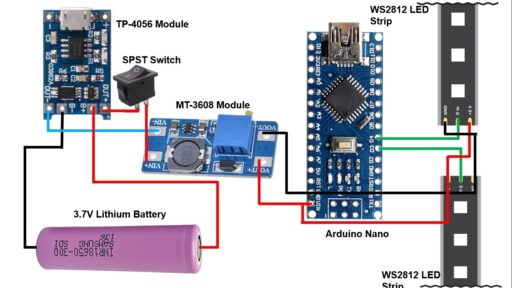
Components :
1) ws2812B led strip 60led/m : https://roboman.in/qtch
2) ws2812B led strip 30led/m : https://roboman.in/6r9a
3) TP-4056 Module : https://roboman.in/oa0m
4) Arduino Nano: https://roboman.in/59h4
5) Arduino Nano Type C : https://roboman.in/xkfu
6) SPST Switch : https://roboman.in/74he
7) 18650 Lithium Battery 2500mah 3C :https://roboman.in/utwc
8) 18650 Lithium Battery 2600mah 3C :https://roboman.in/mmab
9) 18650 Lithium Battery 2200mah 1C :https://roboman.in/70b5
10) 18650 Lithium Battery 2000mah 1C :https://roboman.in/7em9
11) 18650 Lithium Battery 1800mah 1C :https://roboman.in/ywss
12) MT-3608 Boost module : https://roboman.in/xdcw
Code :
// NeoPixel test program showing use of the WHITE channel for RGBW
// pixels only (won't look correct on regular RGB NeoPixel strip1s).

#include <Adafruit_NeoPixel.h>
#ifdef __AVR__
 #include <avr/power.h> // Required for 16 MHz Adafruit Trinket
#endif

// Which pin on the Arduino is connected to the NeoPixels?
// On a Trinket or Gemma we suggest changing this to 1:
#define LED_PINR     3
#define LED_PINL     4

// How many NeoPixels are attached to the Arduino?
#define LED_COUNT  10

// NeoPixel brightness, 0 (min) to 255 (max)
#define BRIGHTNESS 50

// Declare our NeoPixel strip1 object:
Adafruit_NeoPixel strip1=Adafruit_NeoPixel(LED_COUNT, LED_PINR, NEO_GRBW + NEO_KHZ800);
Adafruit_NeoPixel strip2=Adafruit_NeoPixel(LED_COUNT, LED_PINL, NEO_GRBW + NEO_KHZ800);
// Argument 1 = Number of pixels in NeoPixel strip1
// Argument 2 = Arduino pin number (most are valid)
// Argument 3 = Pixel type flags, add together as needed:
//   NEO_KHZ800  800 KHz bitstream (most NeoPixel products w/WS2812 LEDs)
//   NEO_KHZ400  400 KHz (classic 'v1' (not v2) FLORA pixels, WS2811 drivers)
//   NEO_GRB     Pixels are wired for GRB bitstream (most NeoPixel products)
//   NEO_RGB     Pixels are wired for RGB bitstream (v1 FLORA pixels, not v2)
//   NEO_RGBW    Pixels are wired for RGBW bitstream (NeoPixel RGBW products)

void setup() {
  // These lines are specifically to support the Adafruit Trinket 5V 16 MHz.
  // Any other board, you can remove this part (but no harm leaving it):
#if defined(__AVR_ATtiny85__) && (F_CPU == 16000000)
  clock_prescale_set(clock_div_1);
#endif
  // END of Trinket-specific code.
Serial.begin(9600);
  strip1.begin();           // INITIALIZE NeoPixel strip1 object (REQUIRED)
  strip1.show();            // Turn OFF all pixels ASAP
  strip1.setBrightness(50); // Set BRIGHTNESS to about 1/5 (max = 255)
    strip2.begin();           // INITIALIZE NeoPixel strip1 object (REQUIRED)
  strip2.show();            // Turn OFF all pixels ASAP
  strip2.setBrightness(50); // Set BRIGHTNESS to about 1/5 (max = 255)
}

void loop() {
  // Fill along the length of the strip1 in various colors...
 colorWipe(strip1.Color(255,   0,   0)     , 150); // Red
  colorWipe(strip1.Color(  0, 255,   0)     , 150); // Green
  colorWipe(strip1.Color(  0,   0, 255)     , 150); // Blue
  colorWipe(strip1.Color(  0,   0,   0, 255), 150); // True white (not RGB white)
  colorWipe(strip1.Color(255,   0,   0)     , 150); // Red
  colorWipe(strip1.Color(  0, 255,   0)     , 150); // Green
  colorWipe(strip1.Color(  0,   0, 255)     , 150); // Blue
  colorWipe(strip1.Color(  0,   0,   0, 255), 150); // True white (not RGB white)
 //Serial.println("Rainbow");
  whiteOverRainbow(150, 5);
  rainbow(30);
  pulseWhite(5);

  rainbowFade2White(5, 20, 2);
  theaterChaseRainbow(5);
  theaterChaseRainbow(7);
   theaterChaseRainbow(9);
  theaterChaseRainbow(10);
  theaterChaseRainbow(15);
  theaterChaseRainbow(20);
}

// Fill strip1 pixels one after another with a color. strip1 is NOT cleared
// first; anything there will be covered pixel by pixel. Pass in color
// (as a single 'packed' 32-bit value, which you can get by calling
// strip1.Color(red, green, blue) as shown in the loop() function above),
// and a delay time (in milliseconds) between pixels.
void colorWipe(uint32_t color, int wait) {
  for(int i=0; i<strip1.numPixels(); i++) { // For each pixel in strip1...
    strip1.setPixelColor(i, color);//  Set pixel's color (in RAM)
     strip2.setPixelColor(i, color);
    strip1.show();
    strip2.show(); //  Update strip1 to match
    delay(wait);                           //  Pause for a moment
  }
}

void colorWipe2(uint32_t color, int wait) {
  for(int i=0; i<strip1.numPixels(); i++) { // For each pixel in strip1...
    strip2.setPixelColor(i, color);         //  Set pixel's color (in RAM)
    strip2.show();                          //  Update strip1 to match
    delay(wait);                           //  Pause for a moment
  }
}

void whiteOverRainbow(int whiteSpeed, int whiteLength) {

  if(whiteLength >= strip1.numPixels()) whiteLength = strip1.numPixels() - 1;

  int      head          = whiteLength - 1;
  int      tail          = 0;
  int      loops         = 3;
  int      loopNum       = 0;
  uint32_t lastTime      = millis();
  uint32_t firstPixelHue = 0;

  for(;;) { // Repeat forever (or until a 'break' or 'return')
    for(int i=0; i<strip1.numPixels(); i++) {  // For each pixel in strip1...
      if(((i >= tail) && (i <= head)) ||      //  If between head & tail...
         ((tail > head) && ((i >= tail) || (i <= head)))) {
        strip1.setPixelColor(i, strip1.Color(0, 0, 0, 255)); // Set white
        strip2.setPixelColor(i, strip2.Color(0, 0, 0, 255));
      } else {                                             // else set rainbow
        int pixelHue = firstPixelHue + (i * 65536L / strip1.numPixels());
        strip1.setPixelColor(i, strip1.gamma32(strip1.ColorHSV(pixelHue)));
        strip2.setPixelColor(i, strip2.gamma32(strip2.ColorHSV(pixelHue)));
      }
    }

    strip1.show(); // Update strip1 with new contents
    strip2.show(); // Update strip1 with new contents
    // There's no delay here, it just runs full-tilt until the timer and
    // counter combination below runs out.

    firstPixelHue += 40; // Advance just a little along the color wheel

    if((millis() - lastTime) > whiteSpeed) { // Time to update head/tail?
      if(++head >= strip1.numPixels()) {      // Advance head, wrap around
        head = 0;
        if(++loopNum >= loops) return;
      }
      if(++tail >= strip1.numPixels()) {      // Advance tail, wrap around
        tail = 0;
      }
      lastTime = millis();                   // Save time of last movement
    }
  }
}

void pulseWhite(uint8_t wait) {
  for(int j=0; j<256; j++) { // Ramp up from 0 to 255
    // Fill entire strip1 with white at gamma-corrected brightness level 'j':
    strip1.fill(strip1.Color(0, 0, 0, strip1.gamma8(j)));
    strip2.fill(strip1.Color(0, 0, 0, strip2.gamma8(j)));
    strip1.show();
    strip2.show();
    delay(wait);
  }

  for(int j=255; j>=0; j--) { // Ramp down from 255 to 0
    strip1.fill(strip1.Color(0, 0, 0, strip1.gamma8(j)));
    strip1.fill(strip2.Color(0, 0, 0, strip2.gamma8(j)));
    strip1.show();
    strip2.show();
    delay(wait);
  }
}

void rainbowFade2White(int wait, int rainbowLoops, int whiteLoops) {
  int fadeVal=0, fadeMax=100;

  // Hue of first pixel runs 'rainbowLoops' complete loops through the color
  // wheel. Color wheel has a range of 65536 but it's OK if we roll over, so
  // just count from 0 to rainbowLoops*65536, using steps of 256 so we
  // advance around the wheel at a decent clip.
  for(uint32_t firstPixelHue = 0; firstPixelHue < rainbowLoops*65536;
    firstPixelHue += 256) {

    for(int i=0; i<strip1.numPixels(); i++) { // For each pixel in strip1...

      // Offset pixel hue by an amount to make one full revolution of the
      // color wheel (range of 65536) along the length of the strip1
      // (strip1.numPixels() steps):
      uint32_t pixelHue = firstPixelHue + (i * 65536L / strip1.numPixels());

      // strip1.ColorHSV() can take 1 or 3 arguments: a hue (0 to 65535) or
      // optionally add saturation and value (brightness) (each 0 to 255).
      // Here we're using just the three-argument variant, though the
      // second value (saturation) is a constant 255.
      strip1.setPixelColor(i, strip1.gamma32(strip1.ColorHSV(pixelHue, 255,
        255 * fadeVal / fadeMax)));
        strip2.setPixelColor(i, strip2.gamma32(strip1.ColorHSV(pixelHue, 255,
        255 * fadeVal / fadeMax)));
    }

    strip1.show();
    strip2.show();
    delay(wait);

    if(firstPixelHue < 65536) {                              // First loop,
      if(fadeVal < fadeMax) fadeVal++;                       // fade in
    } else if(firstPixelHue >= ((rainbowLoops-1) * 65536)) { // Last loop,
      if(fadeVal > 0) fadeVal--;                             // fade out
    } else {
      fadeVal = fadeMax; // Interim loop, make sure fade is at max
    }
  }

  for(int k=0; k<whiteLoops; k++) {
    for(int j=0; j<256; j++) { // Ramp up 0 to 255
      // Fill entire strip1 with white at gamma-corrected brightness level 'j':
      strip2.fill(strip2.Color(0, 0, 0, strip2.gamma8(j)));
      strip1.fill(strip1.Color(0, 0, 0, strip1.gamma8(j)));
      strip2.show();
      strip1.show();
    }
    delay(1000); // Pause 1 second
    for(int j=255; j>=0; j--) { // Ramp down 255 to 0
      strip2.fill(strip2.Color(0, 0, 0, strip2.gamma8(j)));
      strip1.fill(strip1.Color(0, 0, 0, strip1.gamma8(j)));
      strip2.show();
      strip1.show();
    }
  }

  delay(500); // Pause 1/2 second
}


void rainbow(int wait) {
  // Hue of first pixel runs 5 complete loops through the color wheel.
  // Color wheel has a range of 65536 but it's OK if we roll over, so
  // just count from 0 to 5*65536. Adding 256 to firstPixelHue each time
  // means we'll make 5*65536/256 = 1280 passes through this outer loop:
  for(long firstPixelHue = 0; firstPixelHue < 5*65536; firstPixelHue += 256) {
    for(int i=0; i<strip1.numPixels(); i++) { // For each pixel in strip...
      // Offset pixel hue by an amount to make one full revolution of the
      // color wheel (range of 65536) along the length of the strip
      // (strip.numPixels() steps):
      int pixelHue = firstPixelHue + (i * 65536L / strip1.numPixels());
      // strip.ColorHSV() can take 1 or 3 arguments: a hue (0 to 65535) or
      // optionally add saturation and value (brightness) (each 0 to 255).
      // Here we're using just the single-argument hue variant. The result
      // is passed through strip.gamma32() to provide 'truer' colors
      // before assigning to each pixel:
      strip1.setPixelColor(i, strip1.gamma32(strip1.ColorHSV(pixelHue)));
      strip2.setPixelColor(i, strip2.gamma32(strip2.ColorHSV(pixelHue)));
    }
    strip1.show(); // Update strip with new contents
    strip2.show(); // Update strip with new contents
    delay(wait);  // Pause for a moment
  }
}

// Rainbow-enhanced theater marquee. Pass delay time (in ms) between frames.
void theaterChaseRainbow(int wait) {
  int firstPixelHue = 0;     // First pixel starts at red (hue 0)
  for(int a=0; a<100; a++) {  // Repeat 30 times...
    for(int b=0; b<3; b++) { //  'b' counts from 0 to 2...
      strip1.clear();         //   Set all pixels in RAM to 0 (off)
      strip2.clear();
      // 'c' counts up from 'b' to end of strip in increments of 3...
      for(int c=b; c<strip1.numPixels(); c += 3) {
        // hue of pixel 'c' is offset by an amount to make one full
        // revolution of the color wheel (range 65536) along the length
        // of the strip (strip.numPixels() steps):
        int      hue   = firstPixelHue + c * 65536L / strip1.numPixels();
        uint32_t color = strip1.gamma32(strip1.ColorHSV(hue)); // hue -> RGB
        strip1.setPixelColor(c, color); // Set pixel 'c' to value 'color'
         uint32_t color2 = strip2.gamma32(strip2.ColorHSV(hue)); // hue -> RGB
        strip2.setPixelColor(c, color2); // Set pixel 'c' to value 'color'
      }
      strip1.show();                // Update strip with new contents
      strip2.show();                // Update strip with new contents
      delay(wait);                 // Pause for a moment
      firstPixelHue += 65536 / 90; // One cycle of color wheel over 90 frames
    }
  }
}
